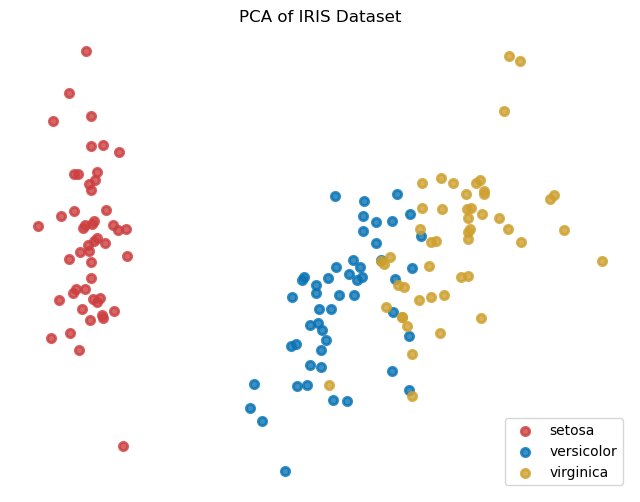
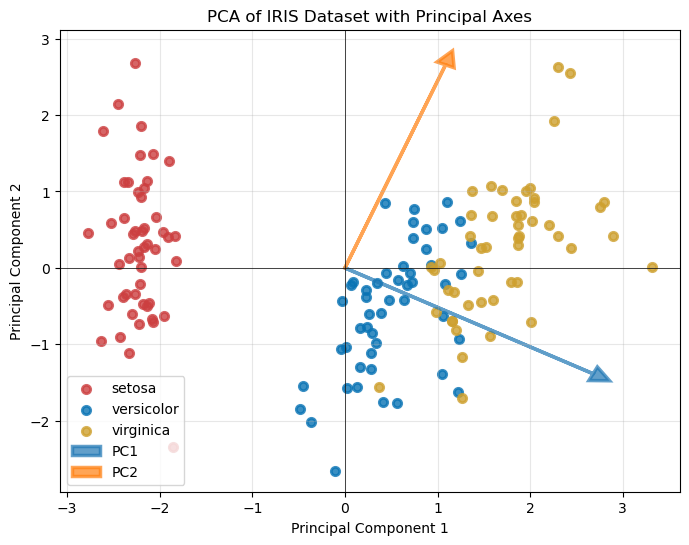
Iris dataset (2d feature)로 PCA를 적용한 예시이다.
import numpy as np
from sklearn.decomposition import PCA
from sklearn.preprocessing import StandardScaler
from sklearn.datasets import load_iris

# 1. Load sample data (Iris dataset)
data = load_iris()
X = data.data

# 2. Standardize the data (Mean=0, Variance=1)
scaler = StandardScaler()
X_scaled = scaler.fit_transform(X)

# 3. Apply PCA (reduce to 2 components)
pca = PCA(n_components=2)
X_pca = pca.fit_transform(X_scaled)

# 4. Check results
print(f"Original shape: {X.shape}")
print(f"Reduced shape: {X_pca.shape}")
print(f"Explained variance ratio: {pca.explained_variance_ratio_}")


import numpy as np

def pca_from_scratch(X, n_components):
    # Step 1: Mean Centering
    X_meaned = X - np.mean(X, axis=0)

    # Step 2: Compute Covariance Matrix
    cov_mat = np.cov(X_meaned, rowvar=False)

    # Step 3: Compute Eigenvalues and Eigenvectors
    eigen_values, eigen_vectors = np.linalg.eigh(cov_mat)

    # Step 4: Sort Eigenvalues and Eigenvectors in descending order
    sorted_index = np.argsort(eigen_values)[::-1]
    sorted_eigenvectors = eigen_vectors[:, sorted_index]

    # Step 5: Select top N components
    eigenvector_subset = sorted_eigenvectors[:, 0:n_components]

    # Step 6: Transform the data
    X_reduced = np.dot(X_meaned, eigenvector_subset)
    return X_reduced

# Example usage
X_scratch = pca_from_scratch(X, 2)
원래 데이터셋은 다음과 같다.
# Visualize Principal Axes
plt.figure(figsize=(8, 6))

# Plot the data points
for color, i, target_name in zip(colors, [0, 1, 2], data.target_names):
    plt.scatter(X_pca[data.target == i, 0], X_pca[data.target == i, 1],
                color=color, alpha=.8, lw=2, label=target_name)

# Plot principal axes
origin = [0, 0]
scale = np.sqrt(pca.explained_variance_)  # Scale by explained variance

for i, (component, var) in enumerate(zip(pca.components_, scale)):
    plt.arrow(origin[0], origin[1],
              component[0] * var * 3, component[1] * var * 3,
              head_width=0.2, head_length=0.2, fc=f'C{i}', ec=f'C{i}',
              linewidth=2.5, alpha=0.7, label=f'PC{i+1}')

plt.legend(loc='best', shadow=False, scatterpoints=1)
plt.title('PCA of IRIS Dataset with Principal Axes')
plt.xlabel('Principal Component 1')
plt.ylabel('Principal Component 2')
plt.grid(True, alpha=0.3)
plt.axhline(y=0, color='k', linewidth=0.5)
plt.axvline(x=0, color='k', linewidth=0.5)
plt.savefig("pca_iris_with_axes.eps")
plt.show()
'연구 Research > 데이터과학 Data Science' 카테고리의 다른 글
| [알고리즘] KDTree로 가장 가까운 포인트 찾기 (0) | 2024.12.28 |
|---|---|
| [데이터과학] scipy interpolation 종류 정리 (0) | 2023.08.25 |
| [matplotlib] x,y축 format 지정하는 방법 (0) | 2023.06.08 |
| [Matplotlib] 3D scatter plot 그리는 코드 (0) | 2023.04.28 |
| [데이터과학] Pandas에서 dataframe 생성 및 export (0) | 2023.04.27 |